Know What's Happening On Every Site.
Before It Costs You.
BuildFlow connects project programmes, site execution, workforce attendance, issues, evidence and reporting — giving construction companies one operational view from office to site.
30 days free · Evaluate BuildFlow on a real project · No long-term commitment
Built for construction companies managing one or multiple active construction sites.
Small Site Problems Become Expensive Problems.
Construction information is often spread between WhatsApp, Excel, paper, email, phone calls, individual project managers and separate systems.
Delays
Programme slippage may only become visible after it has already affected other work.
Labour
Management may struggle to verify exactly who was on site and for how long.
Rework
Quality problems become more expensive when discovered late.
Poor Visibility
Management cannot act quickly when important site information takes too long to reach them.
The Earlier Management Sees The Problem, The Earlier They Can Act.
Your Project May Be Worth R20 Million.
Do You Know What's Putting That R20 Million At Risk Today?
BuildFlow does not replace your accounting system. It helps management control the operational activities that can affect project cost, programme and margin.
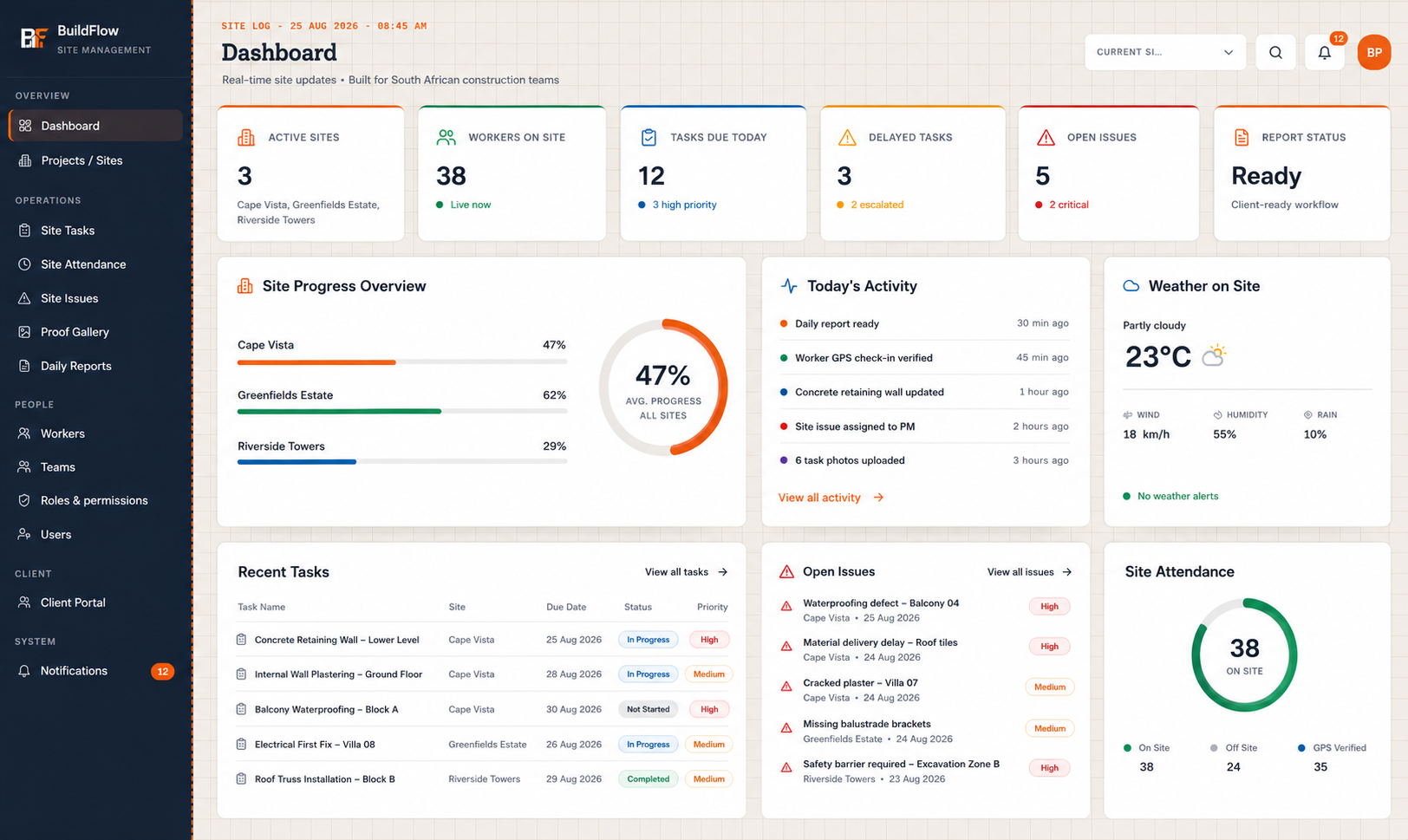
One Command Centre. Every Site.
Give owners and management a real-time operational view across their construction projects.
- Active projects
- Project progress
- Workers on site
- Tasks due
- Delayed tasks
- Open issues
- Recent activity
- Weather
- Reporting status
- Important notifications
Move from individual site information to company-wide visibility.
One Company. Multiple Sites. One Operational View.
Move between projects while maintaining central visibility across the construction business.
Site A
42 Workers
Site B
27 Workers
Site C
61 Workers
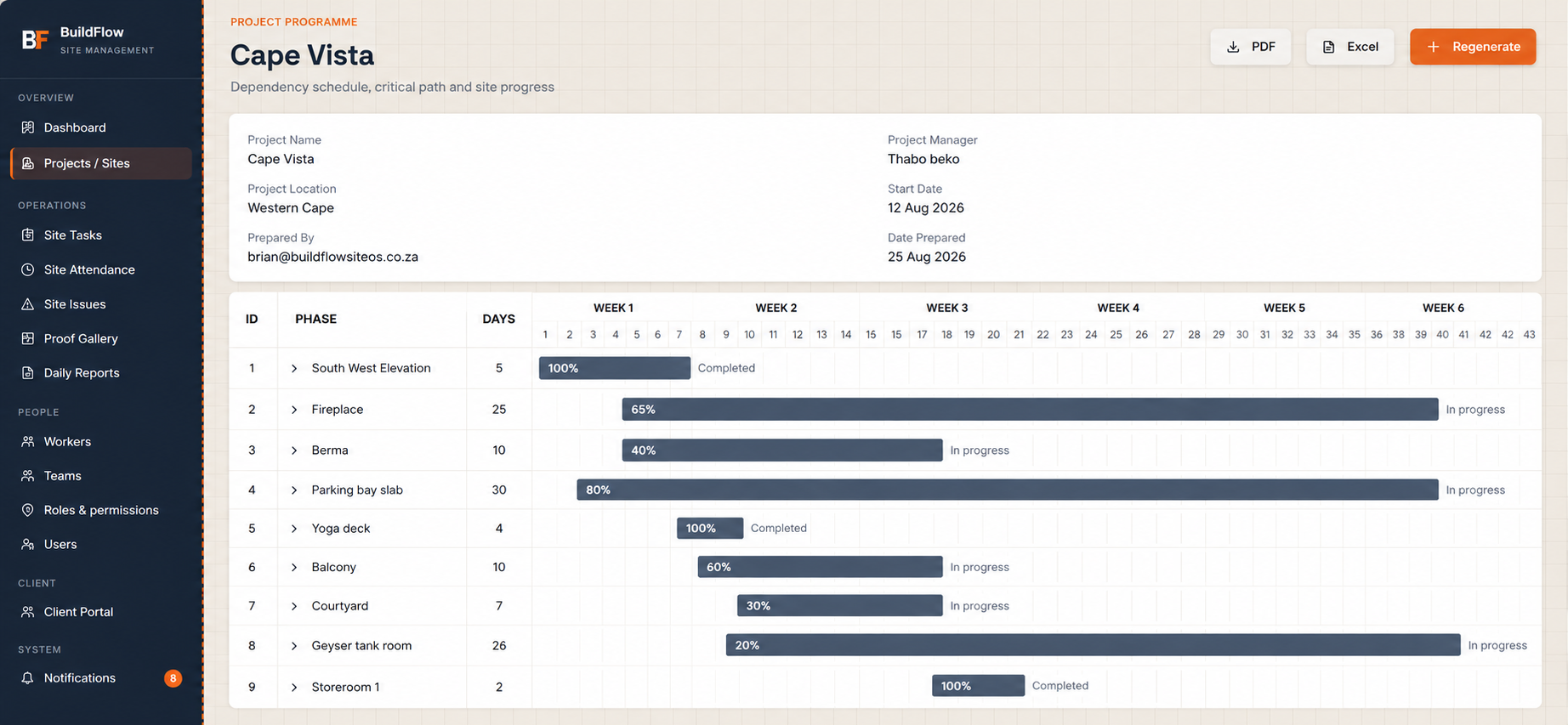
From Programme To Site Execution.
Plan the project, connect the work and understand how changes on site affect the programme.
- Construction phases
- Start & finish dates
- Phase durations & progress
- Critical path
- Programme delays
- Baseline vs forecast completion
- Tasks inside phases
- Dependencies
Turn The Programme Into Action.
Project phases can be broken into smaller, manageable construction tasks that connect directly back to the programme.
When One Task Moves, Understand What Comes Next.
Dependent task dates can update when earlier work changes — so the impact of a delay is visible, not discovered later.
Give Workers What They Need. Nothing They Don't.
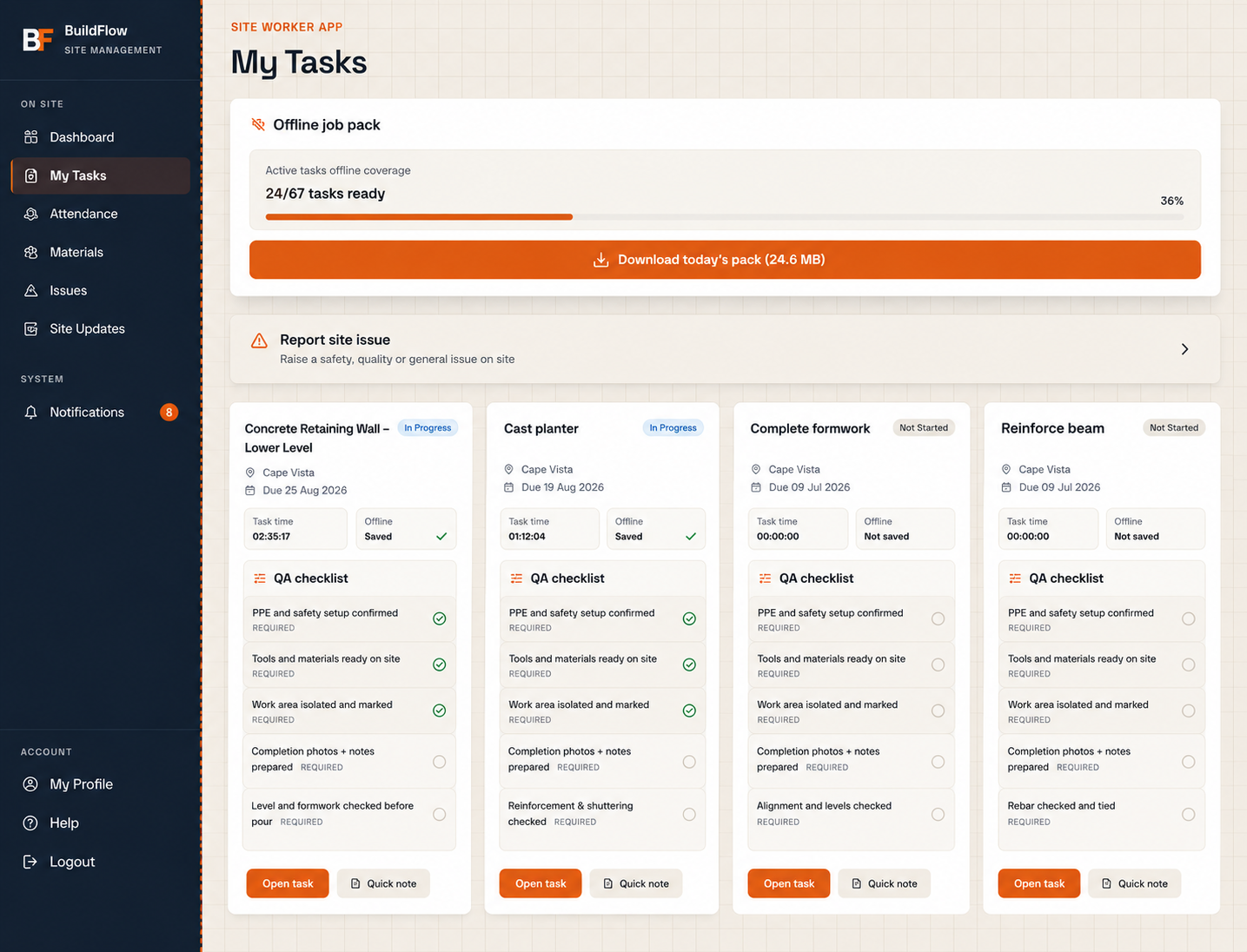
Site workers get a simplified interface built for daily site work — not the full management platform.
- See assigned tasks
- Start & complete work
- View deadlines
- Follow QA checklists
- Follow safety requirements
- Upload evidence
- Add voice notes
- Report issues
- View recent activity
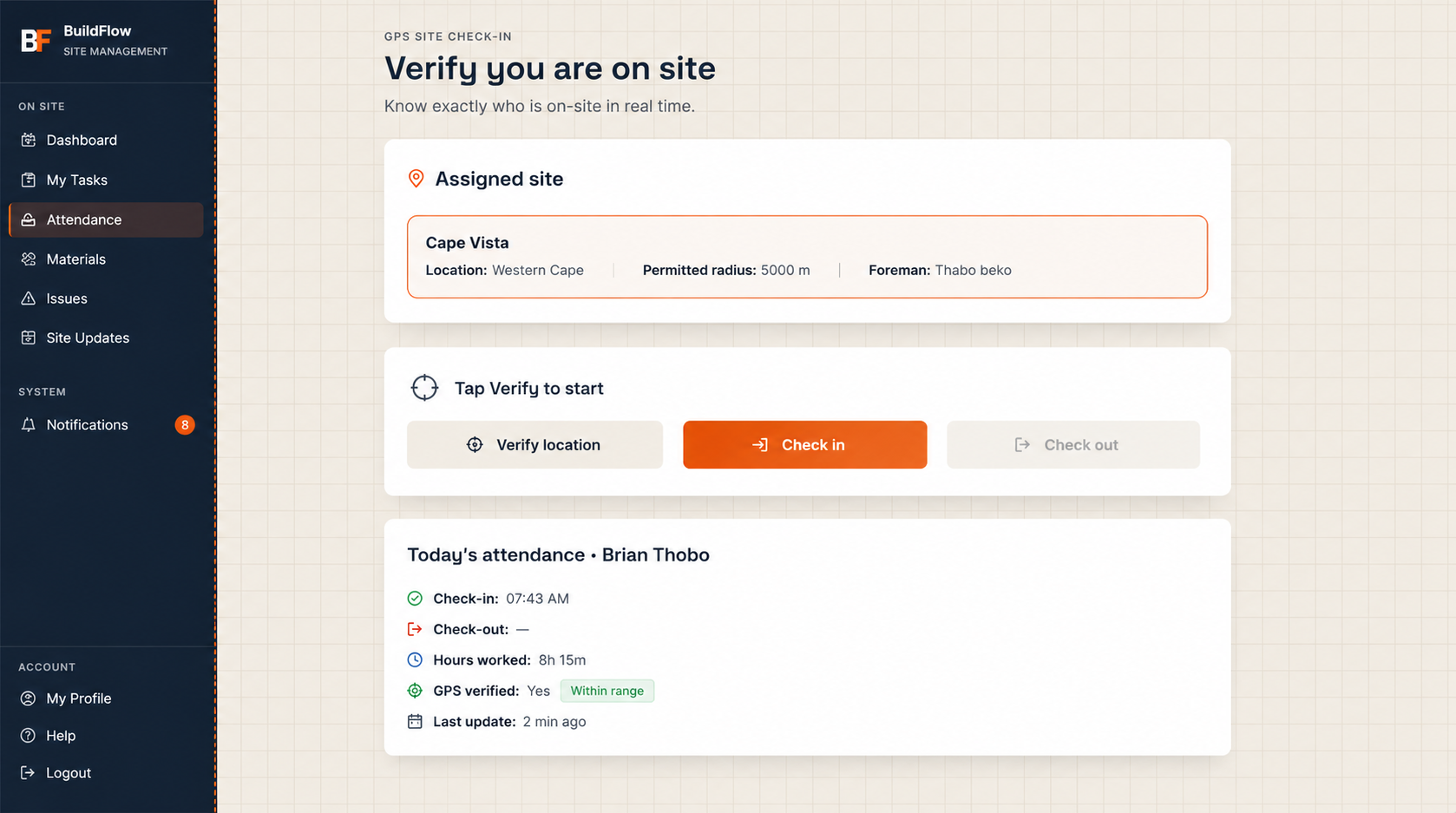
Know Who Is Actually On Site.
Workers verify their location against the assigned construction site when checking in. BuildFlow is not payroll software — it gives management workforce visibility, not wage or payroll calculations.
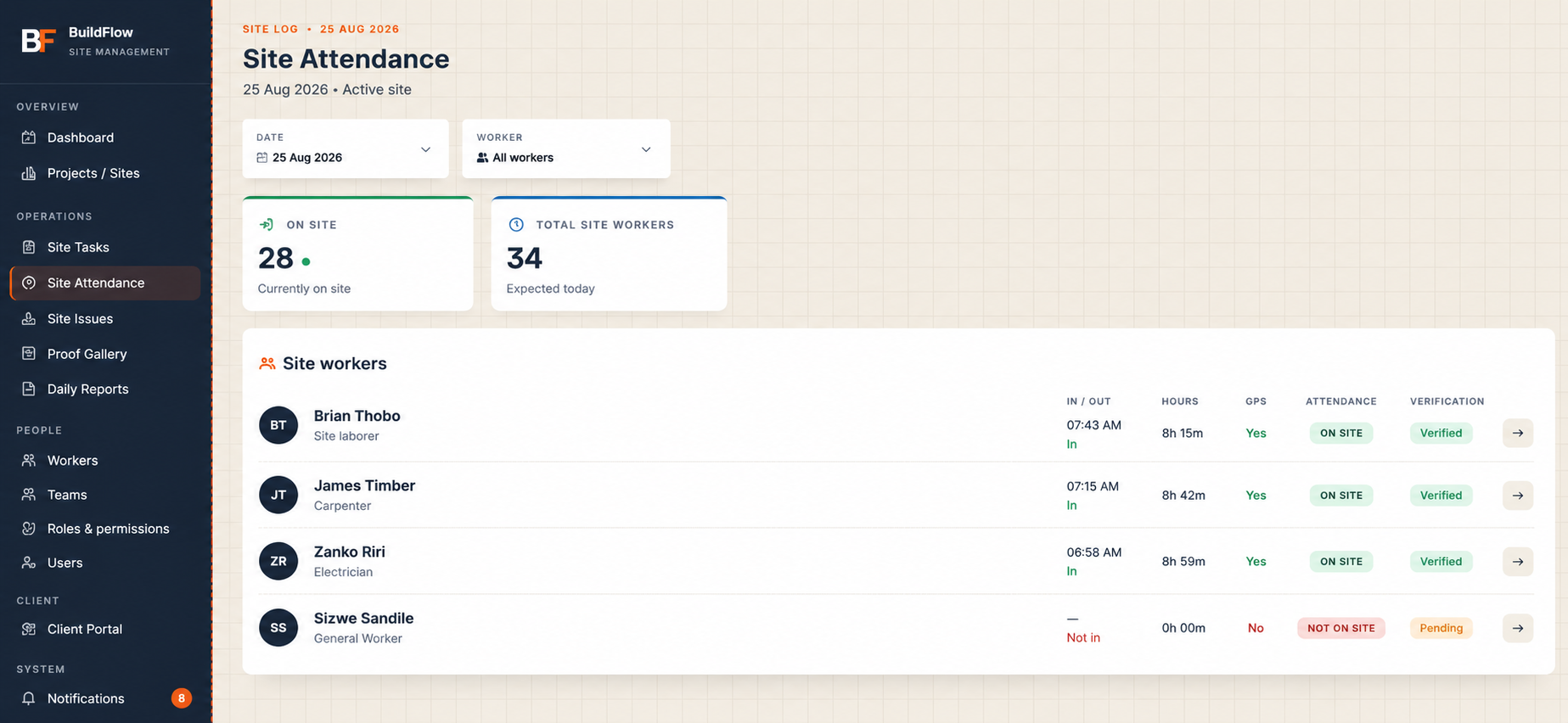
Turn Attendance Into Workforce Visibility.
Management can verify labour presence and understand how workforce resources are being allocated across projects. BuildFlow does not calculate wages or payroll.
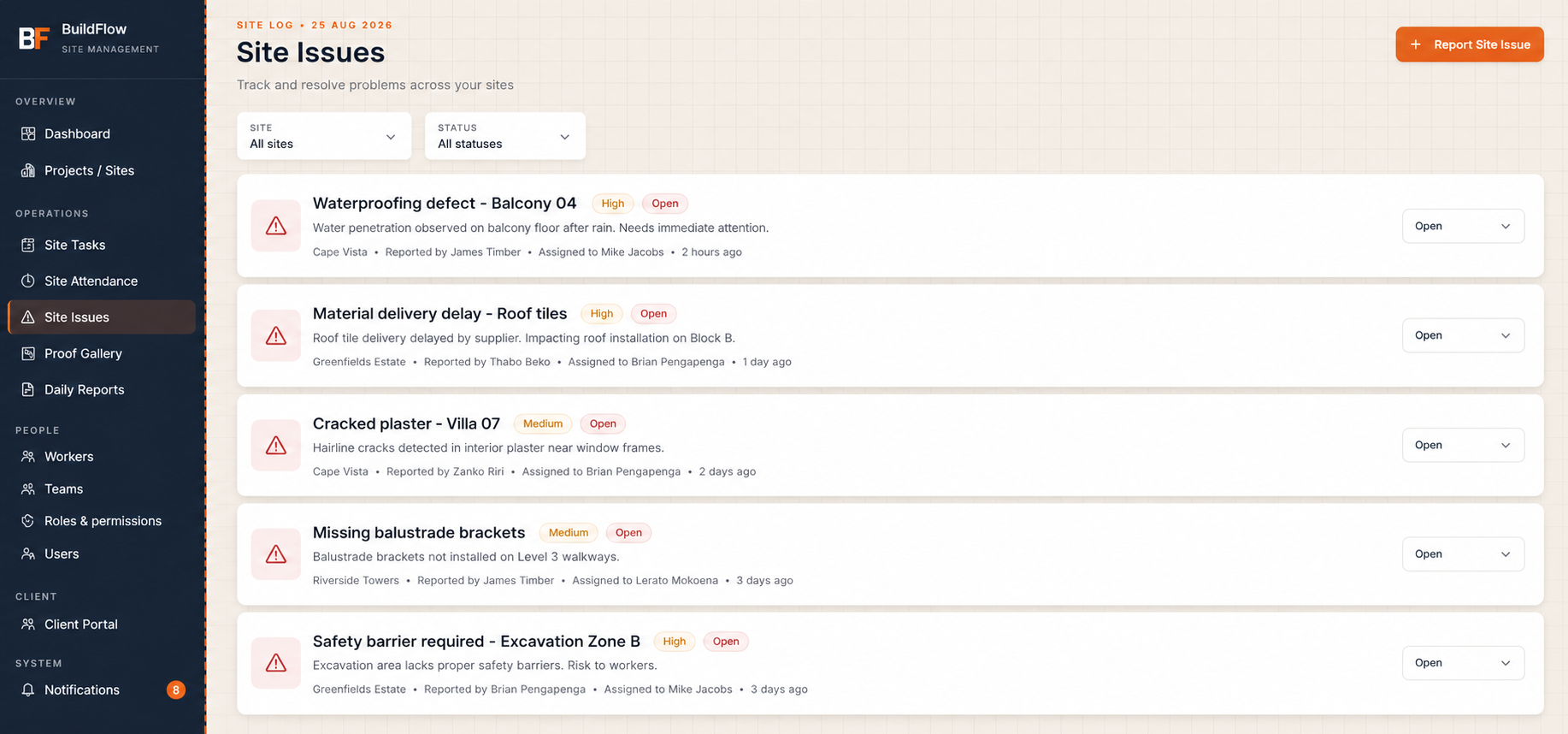
Catch Problems Before They Become Rework.
Issues carry priority, status, assignee, photographs, comments and related project or task information.
Problems documented early are easier to manage before they affect other work, programme dates or handover.
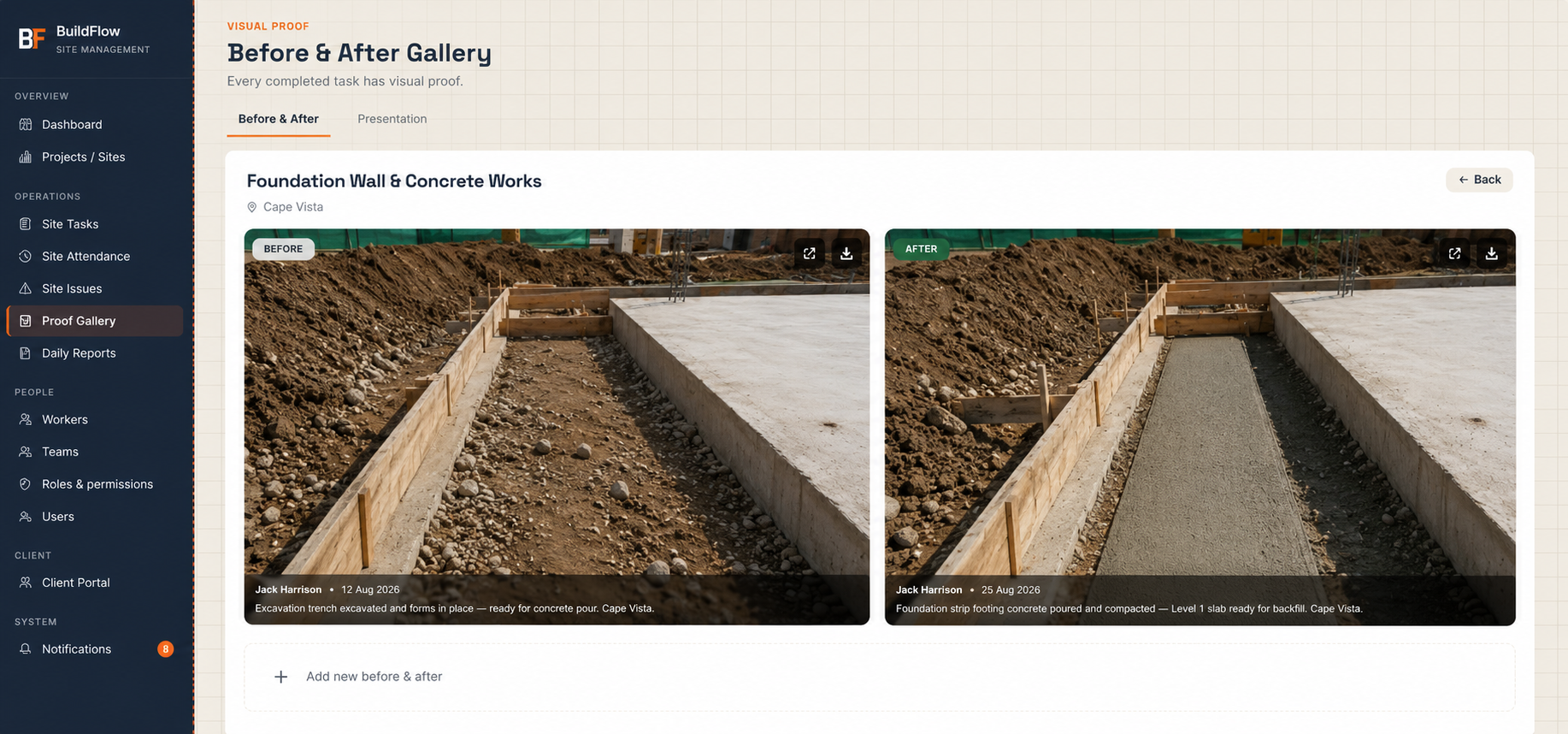
Proof, Not Guesswork.
Photographic evidence connects directly to construction activity — before photos, after photos, progress evidence and completion evidence, each with upload dates and related tasks.
Build Quality Into The Task.
Task checklists help standardise quality control, safety checks, completion requirements, inspection preparation and consistent work — connected directly to task evidence.
Site Updates Without The Typing.
Workers can attach spoken updates to tasks — useful when typing on site is inconvenient.
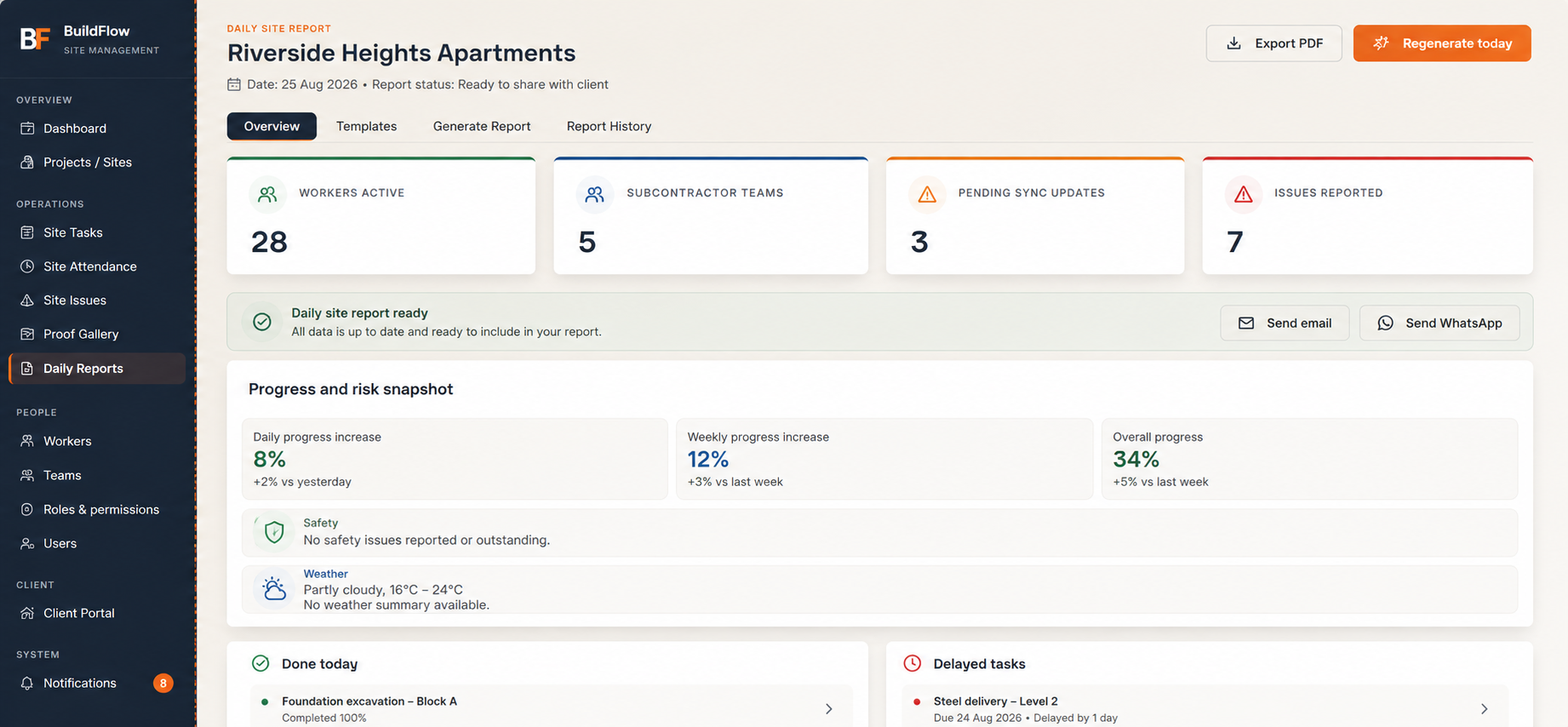
Turn Site Activity Into Client-Ready Reporting.
- Work completed
- Tasks in progress
- Delayed tasks
- Worker attendance
- Site issues
- Photographic evidence
- Progress information
- Weather / site information
See What The Site Needs Next.
Look-ahead information helps management prepare proactively for what's coming.
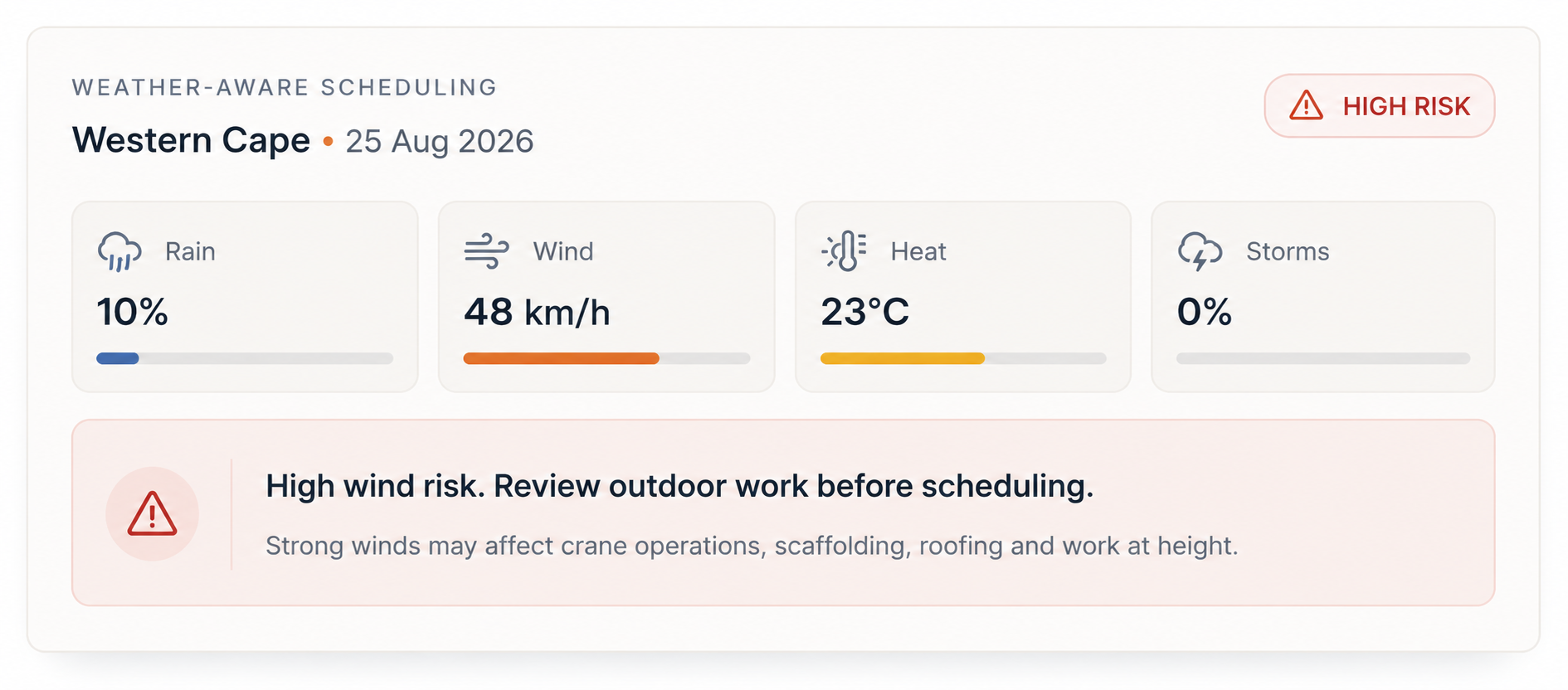
Plan With Site Conditions In Mind.
BuildFlow can warn management when forecast conditions — rain, strong wind, heat or storms — may be unsuitable for planned construction work. BuildFlow does not automatically move project phases because of weather; it provides warnings and decision support.
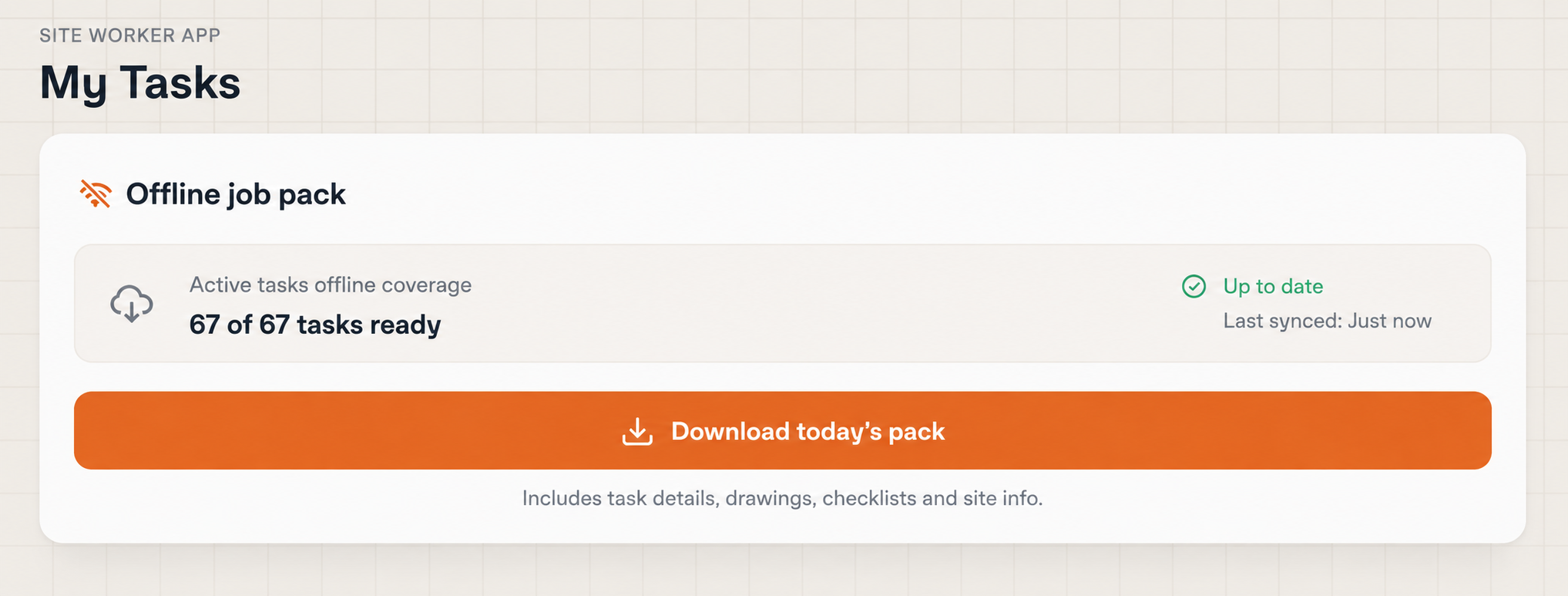
Keep Critical Job Information Available When Signal Drops.
Workers can download assigned job information while connected, so previously downloaded task information remains available in poor-connectivity areas.
Current functionality is primarily offline read-cache support for downloaded task packs — not full offline write synchronisation.
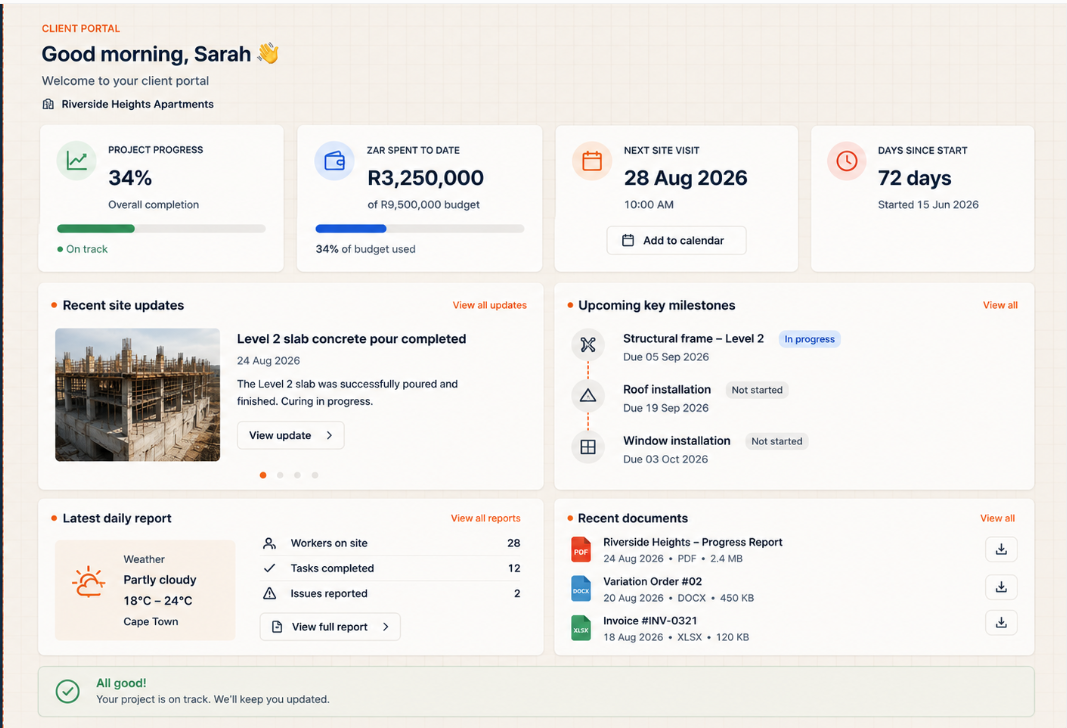
Keep Clients Informed Without Exposing Internal Operations.
Clients see approved information only — never private internal management data.
Different People. Different Access.
Owner, manager, team leader, worker and client roles each receive a level of access based on their responsibilities. Custom roles and permissions are also supported.
Your Company. Your Projects. Your Data.
One company cannot access another company's projects, workers, tasks, attendance, issues, reports or roles.
Your Data Belongs To You.
Customer data belongs to the customer, not BuildFlow. Your project information remains your information — if you decide to leave, you'll be able to export your data so you're never locked out of your own project records.
Customer Ownership
Your company's project data belongs to your company.
Data Export
Customers can export their project information when leaving the platform.
No Data Lock-in
Leaving BuildFlow should not mean losing access to your own construction records.
What Happens To Your Data If You Leave?
BuildFlow's data-retention approach: customer data may be retained for up to 2 years after a customer leaves the platform, after which it is intended to be permanently deleted. This describes BuildFlow's policy and intended approach — automatic enforcement of the retention and deletion lifecycle is being implemented on the platform.
Built With Company Data Separation In Mind.
Connect BuildFlow To Your Existing Technology Stack.
Integration requirements can be scoped according to the systems already used by your construction company.
Smartsheet
Microsoft 365
Power BI
Accounting systems
Enterprise construction systems
Custom & third-party systems
No integrations are currently enabled by default — each is scoped and configured for your organisation during implementation.
Run BuildFlow On A Real Site For 30 Days.
Don't just watch a software demo. Put BuildFlow into the hands of your project team and see how it works with your actual site operations.
Create Your Company
Set up your BuildFlow workspace.
Add Your Site & Team
Create your first project and invite your team.
Run Your Site
Use BuildFlow for programme management, tasks, attendance, issues, evidence and reporting for 30 days.
Prefer a guided introduction? Book a Live Demo
What Can You Test During Your 30 Days?
Don't Evaluate BuildFlow From A Brochure.
Evaluate It On Your Site.
Use your trial to understand whether BuildFlow gives your management team better visibility into programme progress, labour attendance, site issues, evidence and reporting.
What Does Poor Site Visibility Cost?
BuildFlow gives management earlier visibility into the operational events that can create these costs.
Pricing Built Around Your Operation.
Choose the BuildFlow licence that fits your operation. Implementation is configured around your sites, workflows and integration requirements.
Core
For smaller construction teams bringing site operations into one connected system.
- Project & site management
- Tasks and progress tracking
- Issue tracking
- Worker workflows
- Photo evidence
- Daily site reports
- Standard dashboards
- Platform maintenance & updates
Professional
For established construction companies managing multiple active projects, sites and teams.
- Everything in Core
- GPS site check-ins
- Workforce attendance visibility
- Offline job packs
- Weather-aware scheduling
- Client portal
- Advanced reporting
- Multi-site visibility
- Selected integrations
Enterprise
For large construction organisations requiring advanced workflows, integrations and management control.
- Everything in Professional
- Custom integrations
- Smartsheet integration
- Custom operational workflows
- Executive reporting
- Advanced permissions
- Priority support
- White-label options
Every BuildFlow deployment is configured around your organisation.
Implementation is quoted separately based on your number of sites, workflows, users and integration requirements.
Includes platform setup, project configuration, user roles, workflow configuration, team onboarding and launch support.
More than software access.
Every active BuildFlow licence includes:
Start with BuildFlow free for 30 days.
Use BuildFlow on a real project before deciding which plan fits your company.
Built Around Real Construction Workflows.
Programme-first execution
Work is planned as phases and tasks, not ad-hoc lists.
GPS-verified attendance
Location verification, not just a timestamp.
Evidence-linked tasks
Photos and checklists connect back to the task that produced them.
Reporting from real activity
Daily reports draw from what was actually logged on site.
Role-based access
Owners, managers, team leaders, workers and clients each see what's relevant to them.
Straight answers before we talk.
Can BuildFlow replace WhatsApp and paperwork?
Yes. BuildFlow centralises site communication, task execution, evidence and reporting in structured, accountable workflows.
Does BuildFlow work offline?
Site teams can download job packs while connected and keep working from that cached information without signal. This is offline read access, not full offline write synchronisation — check with us for the latest sync coverage for your workflow.
Can clients view progress?
Yes, where enabled. The client portal gives approved stakeholders access to progress, photos, milestones, reports and documents — without exposing internal management data.
Does BuildFlow support multiple projects?
Yes. The management dashboard provides consolidated visibility across multiple active sites, teams and projects.
Can it integrate with Smartsheet or other systems?
Integrations, including Smartsheet, are scoped and configured per customer during implementation rather than enabled by default. Talk to us about your specific requirements.
How long does implementation take?
Our team guides configuration, onboarding and rollout around your sites and workflows for smooth adoption.
What happens after my 30-day trial ends?
Your trial workspace and data are preserved. You'll be able to choose a plan to continue, or contact us — your project information remains exportable and is never held hostage.
Put BuildFlow On Your Site.
See what changes when your programme, workforce, tasks, issues, evidence and reporting are connected in one place.
Evaluate BuildFlow with your own project and team.